Losing an Apple smartwatch is an unpleasant experience. However, the company has anticipated such situations and added effective tools for easily finding lost devices. We explain how to find an Apple Watch using an iPhone and what settings should be adjusted.
Apple created a unified ecosystem for connecting devices. In just a few seconds, the iPhone pairs with the Apple Watch via Bluetooth. The Find My app partly relies on this connection — read more about this tool for finding lost devices in our blog.
When the watch is turned on, it periodically sends encrypted information about its location. The phone then displays it on the map through the linked account.
What Is Needed for Apple Watch Search to Work?
Activate Find My so that searching for a lost watch is easier in the future. Follow these steps:
- Sync the watch with your smartphone.
- Open Settings on Apple Watch.
- Tap the account and select the device from the list.
- Enable Find My Network in the Find My Watch menu.
This enabled option lets you view the location even after the device is turned off.
How to Find an Apple Watch When It Is Nearby
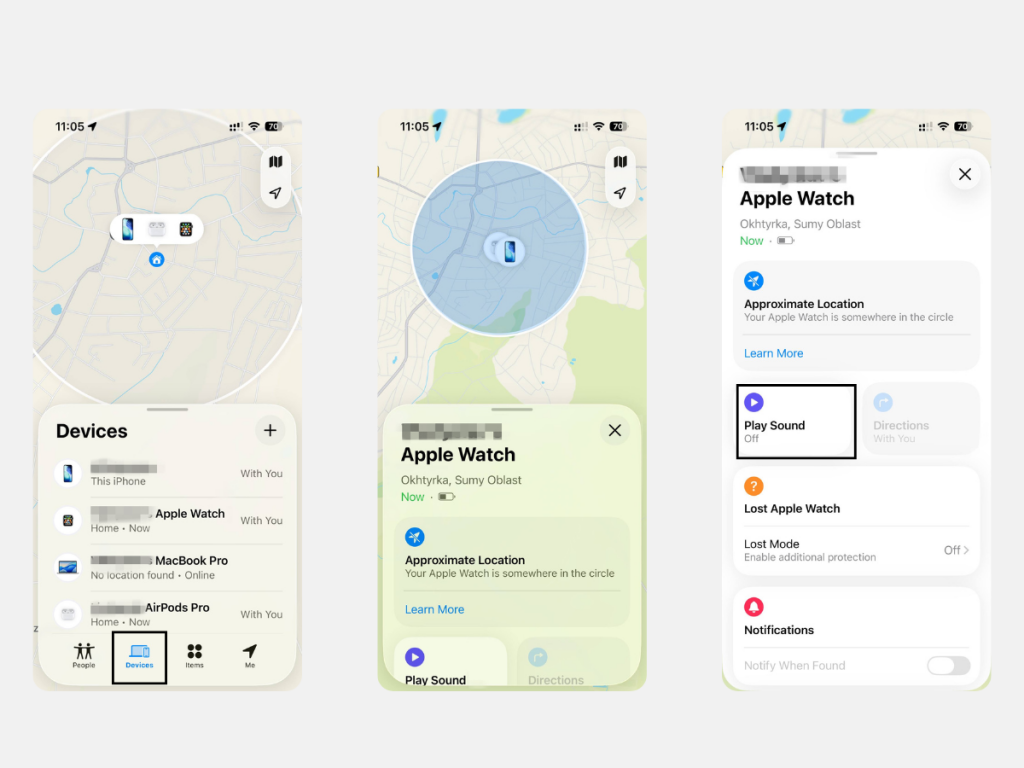
If you are sure the device is nearby, use the sound signal. The process is simple:
- Open the Devices tab in the Find My app on your smartphone.
- Select your device from the list of available ones.
- Tap the Play Sound button.
This tool works if the smartwatch is connected to Wi-Fi or Bluetooth. You will hear a beeping sound, and the signal intensity will increase over two minutes. The sound can be turned off on the iPhone or on the display of the found device.
What to Do if the Smartwatch Is Far Away or Discharged
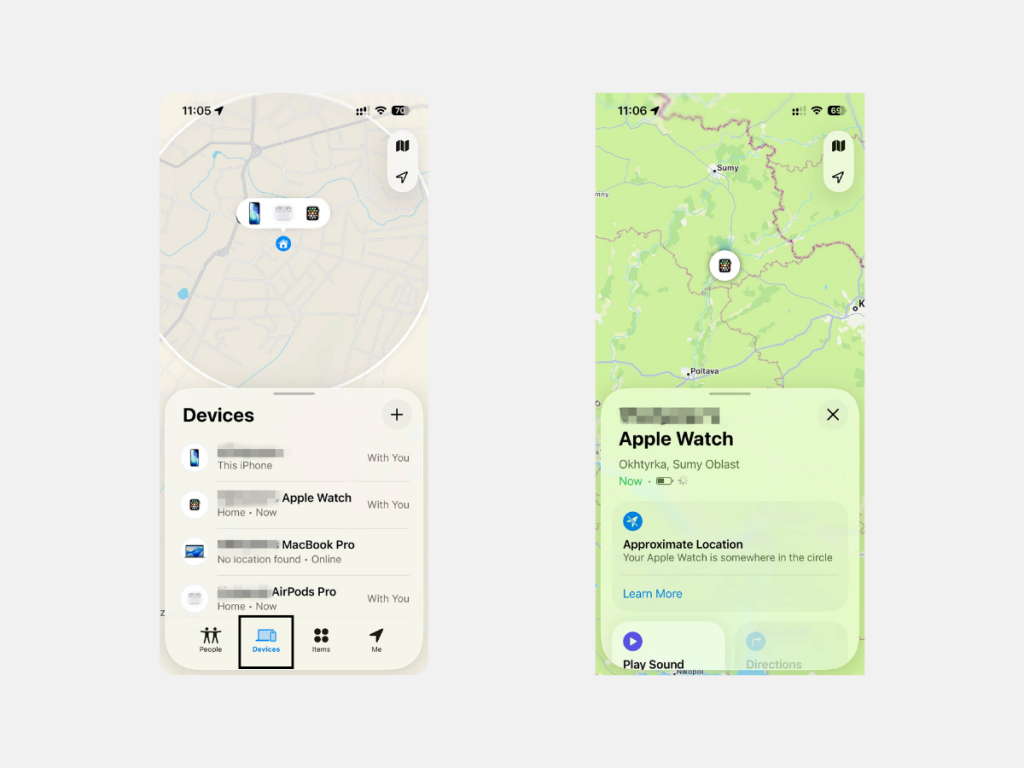
If you lost the device outside your home or its battery has run out, do not worry too soon. The developers added an option that shows the location where the smartwatch was last detected. Open the Devices tab in the Find My app, select the needed device from the list, and check its location on the map.
If the device is not at the marked location, activate Activation Lock. After that, the watch will be locked, and no one will be able to use it without your permission.
How to Find a Lost Apple Watch Without a Connection
If the Apple Watch is disconnected from the internet, the Find My app will show the last recorded location of the device. Series 6 models and later have a built-in chip that continues to transmit a Bluetooth signal for several hours even after the watch is turned off.
The Notify When Found feature is also useful. When the smartwatch reconnects to the network, a notification will appear on the linked iPhone. You can also switch to Lost Mode and display a phone number or contact instructions on the watch screen. This way, anyone who finds the device will know how to reach you.
Tips for Finding an Apple Watch Using an iPhone
All these options are available only if the settings were activated in advance. Without this, the search features will not work.
To improve the chances of finding the watch, follow these steps:
- Regularly update iOS and watchOS.
- Do not turn off Bluetooth to save battery.
- Keep Find My settings active in advance.
Apple continues to add features for convenience. For example, the energy-efficient Bluetooth LE technology keeps the connection with the smartphone while using minimal power. Because of this, it is better not to disable wireless functions unnecessarily.
Conclusion: How to Find a Smartwatch Quickly and Effectively
To avoid wasting time in the future, set up the Find My app on your iPhone. It only takes a few minutes. After that, searching for the smartwatch will be much easier, whether it slipped behind cushions or was left in a changing room.
If you have questions about connecting or using search tools, contact iSpace experts, an Apple Premium Partner in Georgia. You can upgrade your devices in the online store or in physical stores in Tbilisi and Batumi. Delivery across the country and in-store pickup are available.
FAQ
Can a turned-off Apple Watch still be found?
Yes, if the Find My network feature is activated. This option is supported by devices starting from Series 6.
Can an iPhone find a smartwatch without the internet?
The iPhone can show the last recorded location of the smartwatch before it went offline. The only condition is that Find My network must be activated and configured in advance.
How to find a smartwatch without setting up Find My?
It is impossible to make the smartwatch play a sound or see it on the map without setting up Find My beforehand. If this was not done in time, quickly change the Apple ID password and the passwords of related services.
Can another person’s Apple Watch be used for search?
Yes, but only if both people are in the same Family Sharing group. In the Find Devices app, you will see devices linked to all specified Apple IDs. After that, follow the standard instructions.
Check out more
How iPhone Protects Your Data: Apple Security Explained
How to Choose an Apple Watch: Expert Recommendations
iPad Features You’re Probably Not Using (And Should)
Always be aware!
Subscribe to the newsletter and be the first to know about new promotions and special offers