
Start a challenging raid at your desk and continue it on your way to work — the Apple ecosystem has made gaming a seamless experience that goes wherever you go. The iPhone is perfect for gaming on the move, the MacBook is ideal for long gaming sessions, and the iPad lets you relax on the couch and immerse yourself in virtual worlds on a large touchscreen. Apple Arcade offers more than 200 games without ads or in-app purchases, and since September 2026, the service has been included with an iCloud+ subscription. You can buy tablets, smartphones, and laptops for gaming in Georgia at iSpace.
What Games Are Available on Apple Devices?
MacBooks, iPads, and iPhones are versatile devices that are also excellent for gaming. Here are a few reasons why:
- powerful processors ensure smooth performance even in demanding games;
- large displays make it easier to see fine graphical details;
- ray tracing makes shadows, reflections, and lighting more realistic;
- high-capacity batteries make smartphones, tablets, and gaming laptops suitable for extended gaming sessions.
Smartphones are no longer limited to mobile games — classic PC titles have been available on the iPhone for quite some time. For example, Apple Arcade features sports simulators such as NBA 2K26 Arcade Edition and Football Manager 26 Touch. Fans of action-packed adventures can also enjoy Sonic Dream Team.
Apple Arcade — A Gaming Subscription Service
Apple Arcade is a gaming subscription service with a library of more than 200 games across various genres. The collection includes:
- new releases;
- award-winning titles;
- popular games from the App Store.
The regular App Store offers both free and paid apps that users download individually. Apple Arcade, on the other hand, features games without ads or in-app purchases. Previously, access to the service and its game library required a separate monthly subscription. Since September 2026, however, Apple Arcade has been included with iCloud+, so there’s no need to sign up for an additional subscription.
An Apple TV subscription, featuring a collection of Apple Originals movies and series, is also automatically included. Family Sharing remains available as before, allowing up to five additional people to enjoy these services.
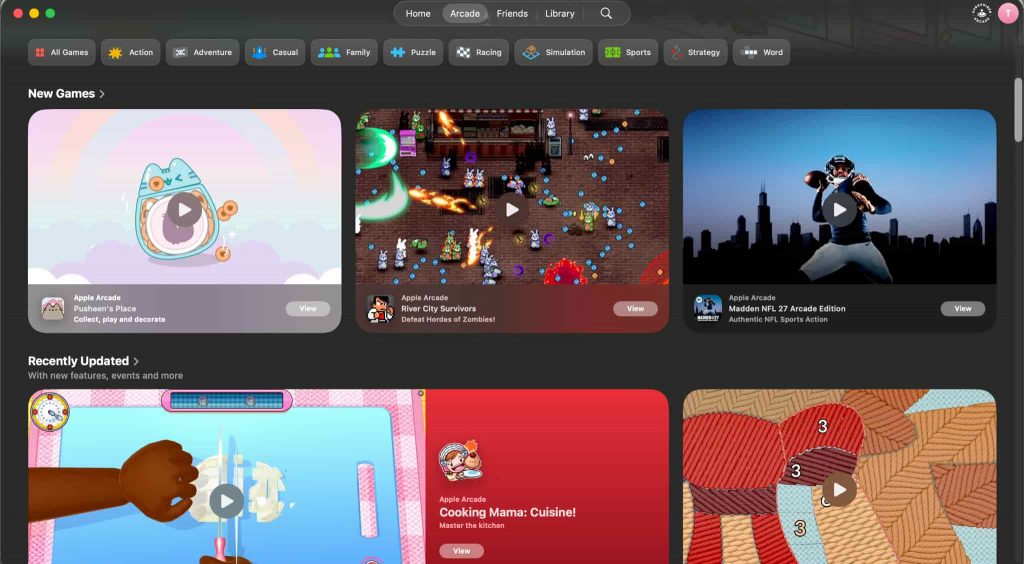
The Arcade Originals category features games created specifically for the service. These titles can be installed on iPad, Mac, iPhone, and Apple TV 4K. Some examples include:
- Sneaky Sasquatch;
- Hello Kitty Island Adventure;
- Sonic Dream Team.
The App Store Greats section features popular App Store games included in the subscription. For example:
- Fruit Ninja Classic+;
- Chameleon Run+;
- Monument Valley+.
Many games can be played offline, making them convenient for gaming on the go. Thanks to iCloud synchronization, your progress in compatible games syncs across devices. You can start playing on your iPhone and continue on your Mac or iPad. All you need is the same Apple Account.
How to Download Games on iPhone or Mac
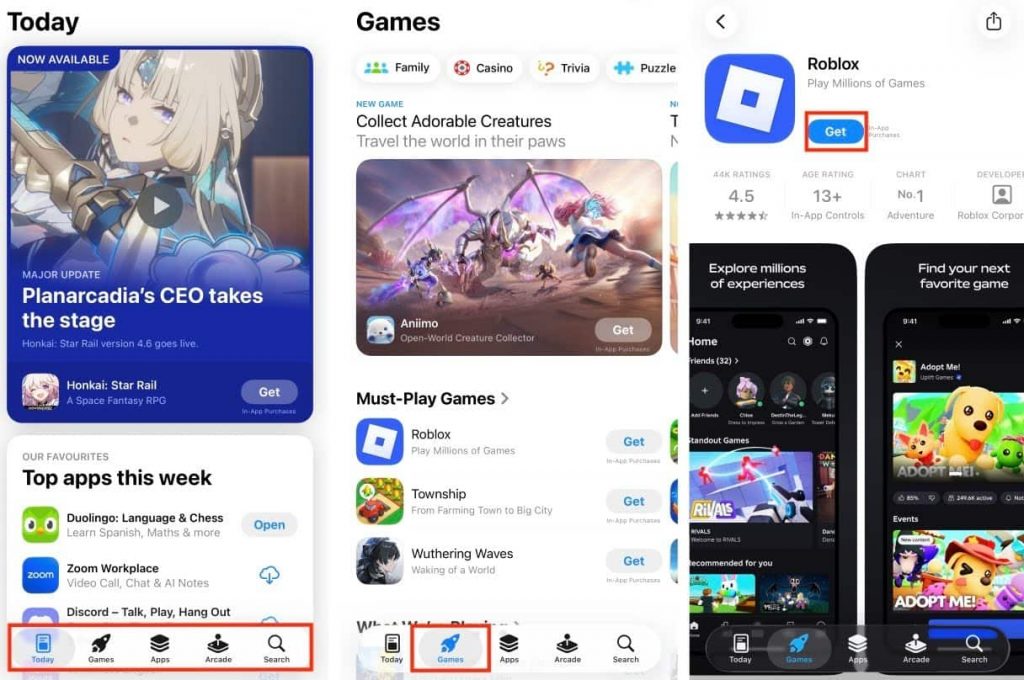
Before downloading, make sure your device is running the latest version of iOS or macOS and that you have an active iCloud+ subscription with access to Apple Arcade. Here’s how to download games on your iPhone or Mac:
- Open Apple Games or the App Store on your device.
- Go to the Arcade tab to browse available games or find a specific title using the search feature.
- Open the game’s page to check its features, device compatibility, and game controller support.
- Tap the download button and wait for the installation to finish.
- Launch the game from Apple Games or its page in the App Store.
To continue playing on another device, sign in with the same Apple Account and install a compatible version of the game. If the game supports iCloud synchronization, your progress will automatically sync when you connect to the internet.
Which Apple Device Should Gamers Choose?
Many video games require powerful hardware, and the latest iPhone models are well-equipped to handle demanding titles. For example, the iPhone 18 Pro is one of the best phones for gaming in 2026. Its upgraded cooling system helps maintain performance under heavy workloads and prevents overheating. The ProMotion display supports a refresh rate of up to 120Hz, ensuring smooth visuals. Thanks to its compact design, you can enjoy gaming anywhere — at home, in a café, or on the go.
The iPad is an excellent choice for those who prefer strategy games, RPGs, and other titles on a large touchscreen. The current lineup offers displays ranging from 8.3 to 13 inches, making it easy to see the details of the game world. You can also connect a game controller for more comfortable gameplay. Models equipped with the M5 chip and a 10-core GPU support hardware-accelerated ray tracing. Beyond gaming, the tablet is also great for watching movies and working on a larger screen, making it a versatile device for everyday use.
For extended gaming sessions at a desk, a laptop is a practical choice. Among Apple devices, the MacBook Pro with the M5 Pro chip is one of the leading options. Here’s what makes it stand out:
- a configuration with a 20-core GPU handles demanding graphics workloads;
- an active cooling system helps prevent overheating;
- six speakers deliver immersive sound without the need for external speakers;
- a Liquid Retina XDR display with ProMotion up to 120Hz provides smooth, detailed visuals.
The MacBook is also a great option if you prefer traditional keyboard and mouse controls.
| Device | Popular Games |
| iPad | Hello Kitty Island Adventure, NBA 2K26 Arcade Edition, Fruit Ninja Classic+ |
| iPhone | NBA 2K26 Arcade Edition, Sonic Dream Team, Fruit Ninja Classic+ |
| MacBook | NBA 2K26 Arcade Edition, DREDGE+, Fruit Ninja Classic+, Sonic Dream Team |
In short, the iPhone is ideal for mobile gaming, the iPad offers a larger touchscreen experience, and the MacBook is perfect for longer gaming sessions while also being a powerful device for work.
Apple Devices for Gaming at iSpace
At iSpace, an Apple Premium Partner in Georgia, you can buy an iPad, iPhone, or Mac. We offer only genuine Apple devices with an official manufacturer’s warranty.
Our experts will answer all your questions and help you decide which laptop is best for gaming. Fast courier delivery is available throughout the country for online orders. If you’d prefer to try out the devices before making a purchase, visit our physical stores in Batumi and Tbilisi.
If you already own an Apple device, take advantage of our Trade In program to upgrade to a newer model. We also offer financing and installment plans. To stay up to date with exclusive offers and company news, join the iSpace Community.
FAQ
What Is Apple Arcade?
Apple Arcade is a subscription-based gaming service. It gives you access to more than 200 games without ads or in-app purchases. Apple Arcade and an Apple TV subscription are now included with iCloud+.
Which Apple Device Is Best for Gaming?
The iPad is ideal for gaming on a large touchscreen, the Mac is great for extended sessions at a desk, and the iPhone makes gaming convenient on the go. When choosing a device, also consider your preferred controls: touchscreen, keyboard and mouse, or game controller.
How to Download Games on iPhone?
Make sure your iPhone is running the latest version of iOS. Then open the Arcade tab in Apple Games or the App Store, choose the game you want, and download it.
Which iPhone Is Best for Gaming?
The iPhone 18 Pro handles demanding workloads over extended periods thanks to its powerful A20 Pro chip and improved vapor chamber cooling system. If you need help deciding which phone is best for gaming, the iSpace experts can guide you through the available options.
What Games Are Available on Apple Arcade?
The service’s library features games across various genres, including RPGs, sports simulators, strategy games, and puzzles. Some of the most popular titles include NBA 2K26 Arcade Edition, Hello Kitty Island Adventure, and Fruit Ninja Classic+.
Check out more
Always be aware!
Subscribe to the newsletter and be the first to know about new promotions and special offers