A laptop for studying is the main tool for every student. The ideal device lasts through a full day of work, lectures, notes, and projects, without the need to constantly look for a power outlet. At the same time, it stays quiet even under load, does not freeze, and responds quickly to every action. This article explains how to choose and buy a laptop for a school or university student.
How to Choose a Laptop for Studying: Specifications
Before buying a device, determine the everyday tasks and academic workload it will need to handle. Some laptops are ideal for coding and graphics, while others are more affordable and better suited to frequent spreadsheet work, creating presentations, and watching long lectures.

Processor
The chip is the “heart” of the device. While preparing for classes, students often have a browser with dozens of tabs, documents, spreadsheets, and presentations open at the same time. A laptop with an Apple chip, including the A-series processor introduced in MacBook Neo, can handle this routine with ease. Modern models also support AI features that can assist with editing text and messages, as well as generating images.
Display
A high-quality screen helps reduce eye strain, even if you need to spend up to ten hours working on a laptop. An optimal display size of 13 inches or more makes it possible to keep several windows open at once without compromising image quality. Meanwhile, the Liquid Retina panel delivers sharp visuals thanks to its high resolution.
Size
For studying, a laptop must be comfortable to carry throughout the day, which is why portability and low weight matter so much. For example, the new MacBook Neo weighs just 1.23 kg, so it is barely noticeable in a backpack even during long commutes.
Battery Capacity
A busy academic schedule requires strong battery life. Apple devices across different lineups can last up to 16–24 hours on a single charge. When heading to class, there is no need to pack a power adapter or spend time searching for an outlet later.
Best MacBooks for Studying: Comparing the Specifications
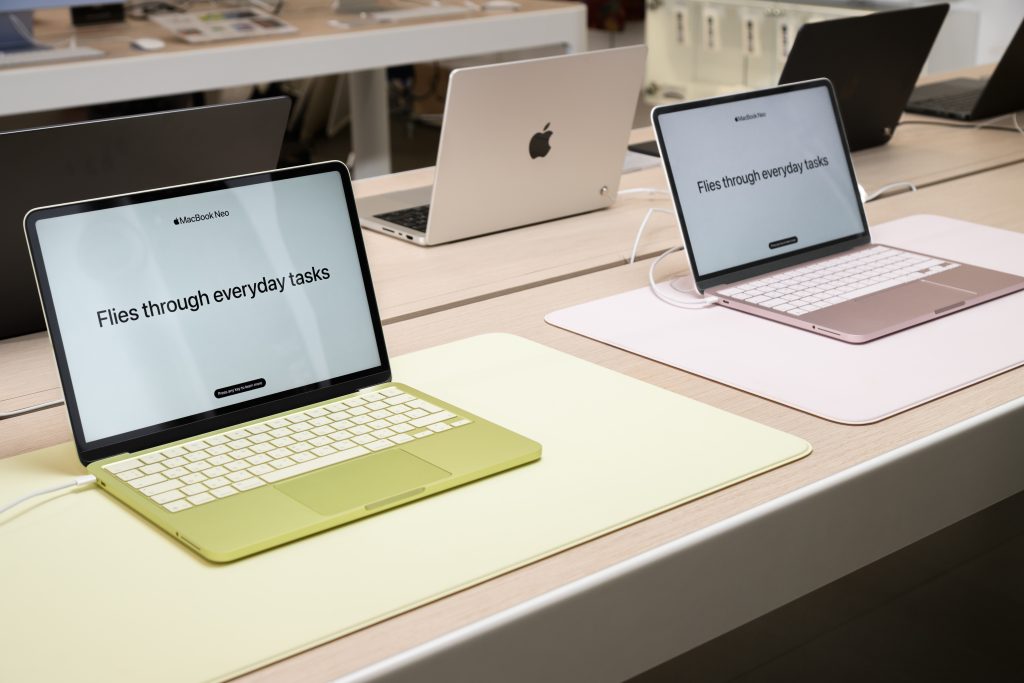
Apple’s laptop lineup offers a wide range of options for different academic needs. Among the most popular models are:
- MacBook Neo – an affordable option for school students, first introduced by Apple in 2026;
- MacBook Air 13″ and 15″ – a device with efficient passive cooling;
- MacBook Pro 14″ and 16″ – the flagship series built for maximum performance.
MacBook Neo is designed for common everyday needs such as web browsing, working with files, and media consumption. It is a good choice for those who want all the advantages of the Apple ecosystem and the experience of working in macOS. Its body is made of durable aluminum, while many models in the same price segment still use plastic.
The right choice depends on the student’s interests and the technical requirements of their studies. The key specifications are collected in the table below.
| Parameters | MacBook Neo | MacBook Air | MacBook Pro |
| Chip | A18 Pro | M5 | M5, M5 Pro, M5 Max |
| Cores | CPU – 6 GPU – 5 | CPU – 10 GPU – 8–10 | CPU – 10–18 GPU – 10–32 |
| Unified Memory | 8 GB | From 16 GB | From 16 GB |
| SSD | From 256 to 512 GB | From 512 GB to 4 TB | From 1 to 8 TB |
| Display Size | 13 inches | 13.6 and 15.3 inches | 14.2 and 16.2 inches |
| Display Type | Liquid Retina | Liquid Retina | Liquid Retina XDR |
| Battery Life | Up to 16 hours | Up to 18 hours | Up to 24 hours |
| Best For | Texts, presentations, browser use | Design, programming, lectures | Complex graphics, 3D modeling, IT |
The current lineup covers the needs of users with very different goals. At the same time, macOS is so clear and well thought out that switching to it feels easy, even after many years of using Windows.
For Studying and Creativity
To sum up, if you are looking for a suitable laptop for a school or university student, MacBook Neo is worth considering. It handles most academic tasks well, from working with documents and presentations to browsing with multiple tabs open and attending online classes. Its compact size makes it easy to carry to class, while up to 16 hours of battery life make it a strong option in its segment, outperforming many budget Windows laptops.
The model is available in bright colours such as Indigo, Citrus, and Blush, while Silver is a good choice for those who prefer a more understated look. It is also an excellent way to enter the Apple ecosystem. At the same time, it syncs easily with other Apple devices, supports AI-powered features, and is suitable for dynamic games.
MacBook: If You Need More Power
If you need more performance, it makes sense to move from an A-series chip to an M-series one. For students studying design, marketing, or accounting, devices from the Air and Pro lineups with the M5 chip are a strong fit. They combine a compact body with a high-quality display and can handle demanding tasks.
A Laptop for Demanding Tasks
If performance is the main priority, it makes sense to look at the Pro lineup with M5 Pro and M5 Max chips. These devices are designed for long periods of intensive work and maintain stable performance during demanding tasks. They are a good fit for students studying architecture, engineering, or film directing.
Apple devices are well-suited to studying and can cover a wide range of academic needs. Choosing a MacBook for studying is easy at iSpace, a retail chain with Apple Premium Partner status in Georgia. In the brand’s physical stores, customers can test the latest devices in person before making a decision. Orders can also be placed on the website by selecting convenient payment and delivery options. If needed, experts can also help with system setup and recommend accessories.
FAQ
Which laptop is suitable for gaming and studying?
Apple has developed a versatile chip architecture that narrows the gap between professional and entertainment tasks. The 2026 Neo model offers a balanced option for studying and gaming, handling everyday workloads with ease.
Which MacBook model is best for a school or university student?
The optimal device is the thin and compact MacBook Neo. It is easy to carry to classes, and its processor is powerful enough for routine academic tasks without performance slowdowns.
How can you save money when buying a laptop for studying?
Mac devices deliver stable performance for years: the hardware handles regular workloads well, and developers continue to release software updates. To make the purchase more affordable, you can also use an installment plan or Trade In at iSpace.
Check out more
Multitasking in macOS: How to Split the Screen on a MacBook for Maximum Productivity
Review Of MacBook Neo Powered By The A18 Pro Chip — Apple Power Accessible To Everyone
MacBook Air With the M5 Chip — A Major New Release of the Year
Always be aware!
Subscribe to the newsletter and be the first to know about new promotions and special offers