Apple device owners occasionally wonder how to manage processes on their phones more efficiently. Many believe that manually clearing memory speeds up the device and makes the interface smoother. In practice, things work differently. In this article, we look at whether you need to close apps on iPhone and how the system handles RAM.
Why Is It Worth Thinking About Closing Tabs on iPhone?
iPhone owners often apply habits from computer use when trying to optimize performance. On a computer, people close running processes to free up resources for new tasks, but the iOS mobile system works differently. It decides on its own where to allocate power. That is why you can switch between messaging apps, YouTube videos, and Lightroom without noticeable delays.

The Effect of Multiple Running Tasks on Performance
Once you minimize a window, the tab moves into the background. iOS freezes the process and reallocates computing resources to other programs. The minimized app keeps its current state in RAM but stops putting a load on the CPU. When you return to the task, it becomes active again.
For example, with the iOS 18 update in 2024, Apple introduced Game Mode. When a game starts, it automatically shifts more resources toward it, while background processes slow down.
Battery and Open Apps: The Real Effect on Battery Life
Relaunching uses more energy than resuming an app. When you force-close it, the device has to reload data, graphics, and algorithms from scratch. This puts extra strain on the battery.
iPhone controls power consumption on its own. There is no need to help it by closing apps manually, as this will not extend battery life.
The Risk of Multitasking: When Does It Become a Problem?
Multitasking on iPhone was introduced with iOS 4 in 2010. At that time, apps were unloaded from memory noticeably more slowly compared to the experience users have now. Today, the system usually takes up to 10 seconds, and the user does not even notice it. Still, some apps may occasionally freeze while being unloaded because of the software itself or the age of the smartphone, and in such cases, they should be force-closed.
System Features of the Operating System: Activity Management
The iPhone operating system has built-in mechanisms for distributing resources. It automatically manages CPU, memory, and power, limits the activity of background apps, and helps save battery life.

How Does iOS Manage Background Apps?
Before closing an app, iOS gives it up to 10 seconds to save information and then moves the process into a frozen state. In some cases, apps can block exit actions. For example, during a video upload, they may warn that you should not swipe them away at that moment. If the system runs low on RAM, it automatically closes unnecessary processes without user involvement.
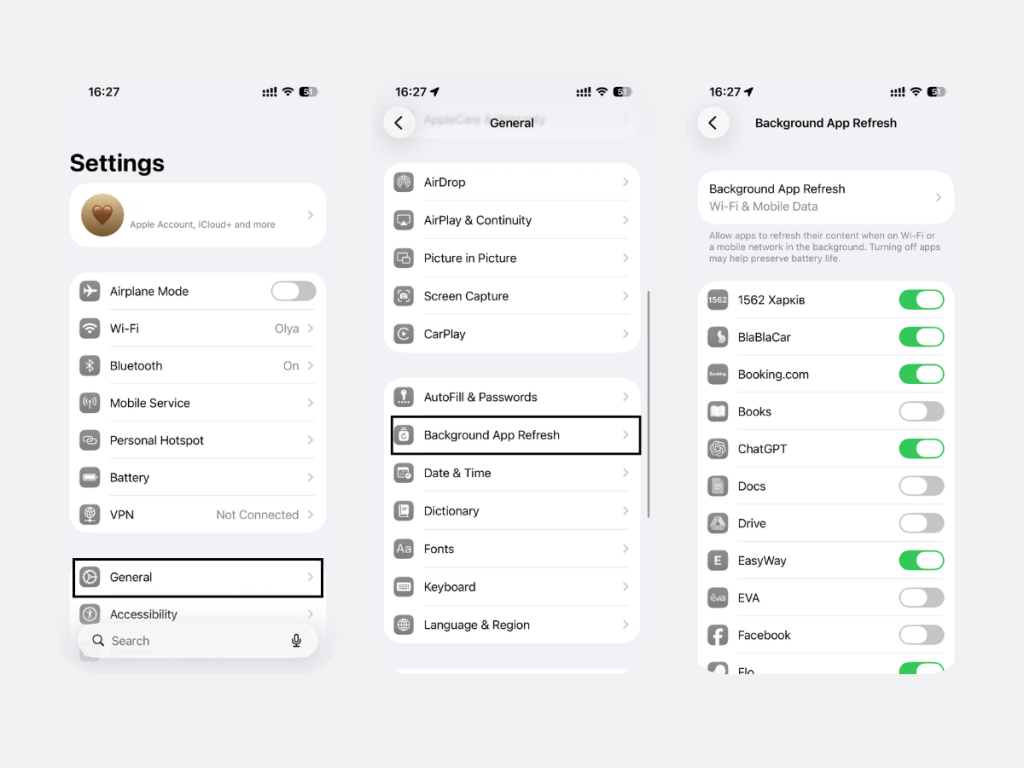
iOS also handles location updates on its own. The system retrieves current information in the background. You can control which apps receive these updates in the “Background App Refresh” section of Settings.
Do You Need to Constantly Close Apps on iPhone?
The system algorithms automatically close older processes when an active task needs additional power. Everything happens in the background, so you get stable performance without noticeable slowdowns, while the device handles the technical side on its own. There is no need to do anything manually.
Power Saving Modes for Additional Optimization
When the battery level drops to 20%, you can use Low Power Mode. This setting limits background updates to reduce battery consumption.
When Is It Actually Worth Closing Tabs on iPhone?
Sometimes user intervention is justified. Situations when it makes sense to manage apps manually include:
- the display does not respond to touches;
- the interface freezes;
- location tracking stays active after using navigation.
To force-close a tab, open the App Switcher, find the one you need, and swipe it up.
If you still have questions, you can contact iSpace experts for advice. The company holds Apple Premium Partner status in Georgia. It is also a place where you can upgrade your device, as iSpace offers only original Apple products. You can place an order on the website or visit a physical store. To make the purchase more выгодной, you can also use Trade In and the loyalty program.
FAQ
Why doesn’t iPhone close apps automatically?
Relaunching an app requires more resources than keeping it frozen in memory. At the same time, the iPhone can still close an app automatically when needed.
Can closing tabs speed up an iPhone?
Closing tabs will not make the interface more responsive. On the contrary, the device will need extra time and resources to reopen the app and reload its data.
How do you close all tabs on an iPhone?
If you have around a dozen apps open at the same time, you will not be able to close them all with a single gesture, because the system does not support mass closing. You can swipe away the cards one by one or grab several preview windows at once and close them in one motion.
Check out more
Multitasking in macOS: How to Split the Screen on a MacBook for Maximum Productivity
How to Quickly Find an Apple Watch Using an iPhone: Tips for Users
Mac Mini: What the Smallest Apple Computer Can Do
Always be aware!
Subscribe to the newsletter and be the first to know about new promotions and special offers