

iPhone users around the world had been eagerly awaiting the release of iOS 27. On September 14, 2026, Apple officially released the new operating system with a strong focus on AI integration. The Siri AI assistant has been redesigned and even received its own dedicated app. Apple Intelligence is now more deeply integrated into everyday apps. Parental controls have become easier to manage thanks to new features, while photo editing is now simpler than ever. In this article, we’ll explore what’s new in iOS 27, how to install it, and which iPhone models are compatible with the update.
Which iPhone Models Support the New iOS?
iOS 27 can be installed on the same devices as the previous operating system — iPhone 11 and newer models, including the second-generation iPhone SE. However, to use Apple Intelligence features, you’ll need an iPhone 15 Pro or a newer compatible model. You’ll also need to select one of the supported languages in your device settings.
Watch this short video to discover what’s new in the iPhone 18 Pro and iPhone 18 Pro Max:
What’s Changed in iOS 27?
The latest version of iOS introduces enhanced AI capabilities and speeds up several everyday processes. Let’s take a closer look at what’s new in iOS 27:
- Redesigned Siri AI. Need to find information in your messages or emails? Just ask the assistant. It can understand what’s displayed on your screen, use your personal context, and perform more tasks across different apps. Siri AI also has its own dedicated app, where your conversation and request history is stored, so you can revisit previous interactions whenever you want. Georgian isn’t supported yet, but English is available.
- Improved performance. Apps launch up to 30% faster, photos appear in the Photos library up to 70% faster, and photos and files transfer via AirDrop up to 80% faster.
- More advanced photo editing tools. AI-powered features let you change the perspective of an existing photo, expand image boundaries, and remove unwanted objects — including larger ones — with greater precision.
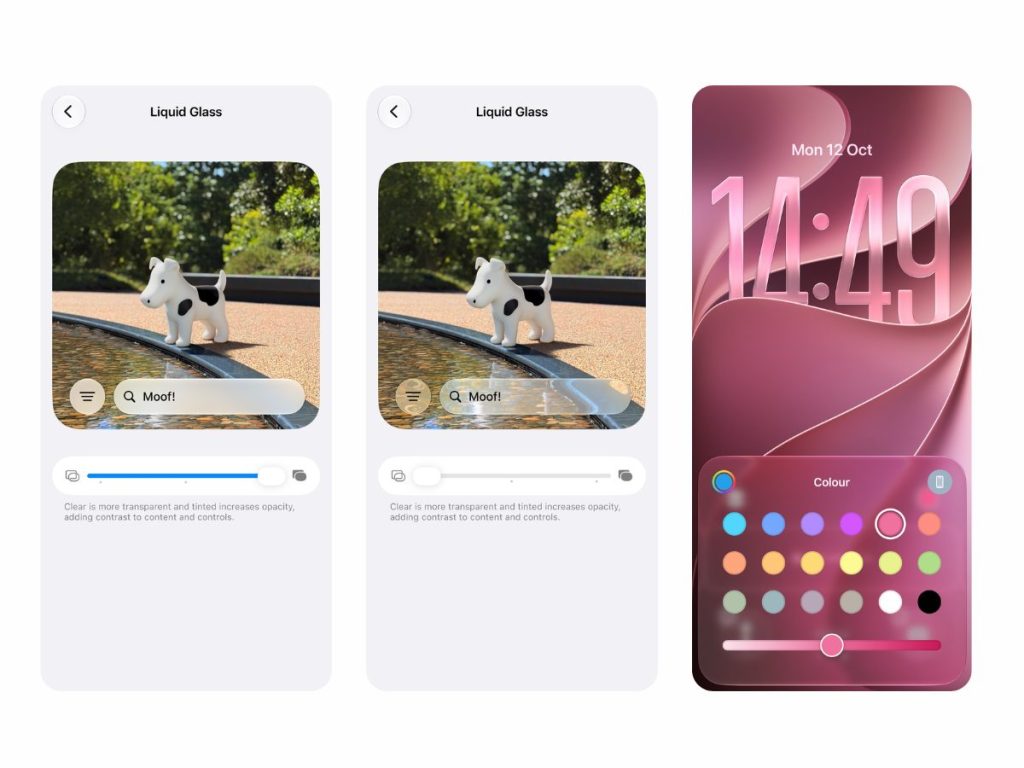
- Adjustable Liquid Glass transparency. You can customize the interface design by making glass-like elements nearly transparent or applying a tinted appearance.
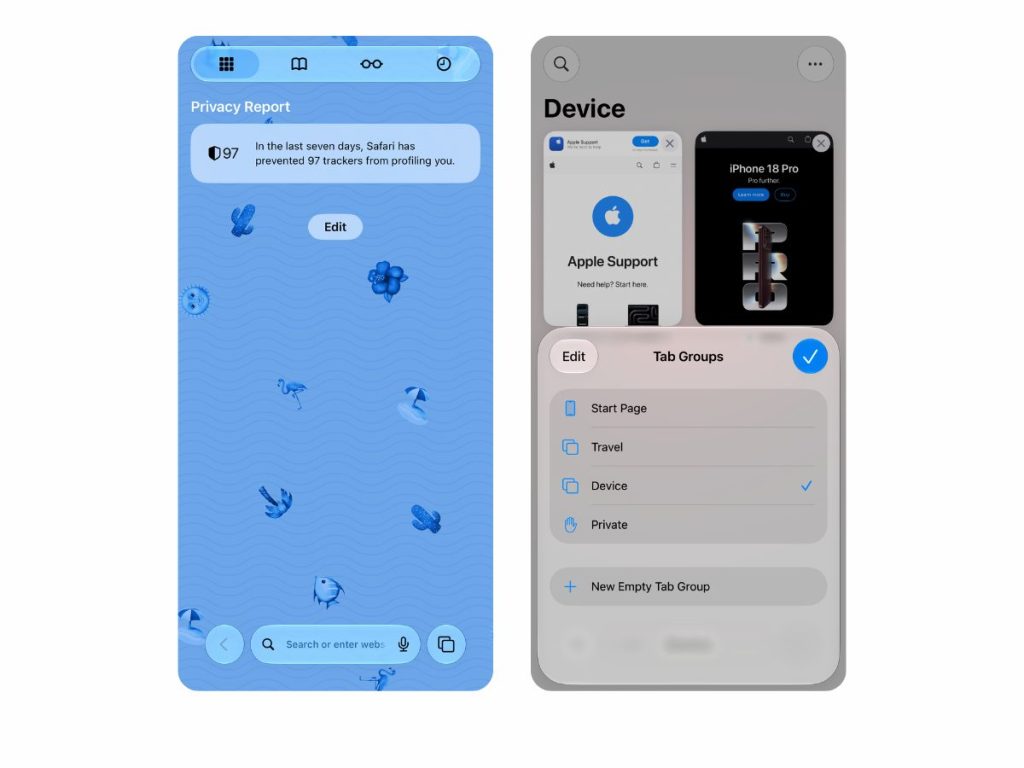
- Safari is now more convenient to use. The Notify Me feature lets you track changes on specific websites and receive notifications when new information becomes available. For example, you won’t have to keep refreshing a website to find out when pre-orders open for a product you want — your iPhone will take care of it for you. The browser also has a slightly refreshed design, and you can now group websites by topic.
- Expanded parental controls. Parents now have more options for managing their children’s device usage. For example, they can decide which apps their child can use and at what times, making it easy to adjust restrictions around the school schedule. The Communication Safety feature can detect more types of inappropriate content, including violence, blood, and graphic scenes, and restrict access to it.
- Easier photo sharing. The new operating system lets you add photos to shared albums, react with emojis, and quickly find specific images using filters. Share your pictures with friends and family through iCloud.com — they can access them even if they don’t use Apple devices.
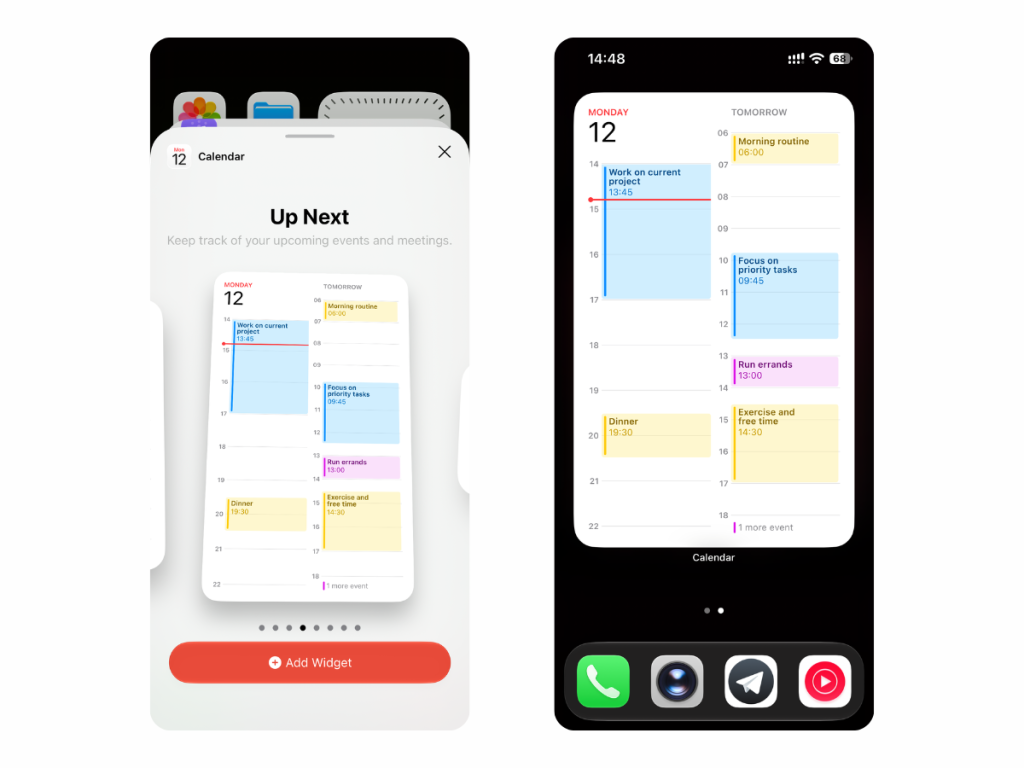
And that’s not all iOS 27 has to offer. Your iPhone now switches between Wi-Fi networks even faster, creating automations in Shortcuts is easier, and widgets for built-in apps can be expanded to fill the entire screen.
You can also adjust system sound volumes separately. For example, you can make your morning alarm louder while keeping system notifications quieter. With the new iOS, using your iPhone is even more convenient.
How to Update Your iPhone to the Latest iOS?
To update to iOS 27, all you need is your iPhone, a Wi-Fi connection, and a little time. Here’s what to do:
- Back up your data. Create a backup so you can restore your data if something goes wrong.
- Prepare your device for the update. Make sure you have a stable internet connection and sufficient battery charge. It’s best to connect your iPhone to a charger.
- Open the software update settings. You can check your current iOS version and available updates under Settings → General → Software Update. Look for the latest available version.
- Start the update. Tap Download and Install and confirm your choice. If you need your phone throughout the day, you can schedule the update for overnight installation.
- Wait for the installation to finish. Follow the on-screen instructions and don’t turn off your device. Your iPhone will restart automatically, and you’ll be able to enjoy all the new iOS 27 features.
If you can’t install the update directly on your iPhone, you can use a computer instead. If you have a Mac running macOS Catalina (2019) or later, follow these steps:
- Connect your iPhone to your Mac using a cable.
- Open Finder.
- Select your iPhone in the sidebar.
- Go to General → Check for Update.
- Download and install iOS 27 if it’s available.
If your Mac is running macOS Mojave or an earlier version, follow the same steps using iTunes instead of Finder.
You can also update your iPhone using a Windows laptop or desktop computer. Connect your iPhone with a cable, download the Apple Devices app from the Microsoft Store, and open it. Select your device in the sidebar, then go to General → Check for Update → Update.
Installation issues can sometimes occur if your iPhone doesn’t have enough free storage space. In this case, delete unnecessary files (or move them to cloud storage) and try installing the update again.
If you have any questions, contact the iSpace experts for assistance. You can reach them online by phone or through the website’s live chat, or visit a physical store in Batumi or Tbilisi.
At iSpace, an Apple Premium Partner, you can upgrade to a new device at a great price. We offer only genuine Apple products with a manufacturer’s warranty, a Trade In program, and installment plans and financing. Order your device online with home delivery or pick it up in person at a store. And to stay updated on our exclusive offers, join the iSpace Community.
Explore our selection and choose your new iPhone:
FAQ
When Was iOS 27 Released?
The new operating system was unveiled at WWDC26 on June 8, 2026. The official iOS 27 release date was September 14, 2026.
Which iPhone Models Support the Latest iOS Update?
The September iOS update can be installed on iPhone 11 and newer models. However, Apple Intelligence and Siri AI are only available on iPhone 15 Pro and later compatible devices. Access to certain features also depends on your country and device language. Georgian is not supported yet, but English is available.
What’s New in iOS 27?
The main improvements include enhanced parental controls, the Siri AI assistant, and upgraded photo editing tools. You can now easily adjust Liquid Glass transparency and use enhanced iCloud Shared Albums.
How to Install iOS 27 on iPhone?
Back up your data to iCloud or a computer. Connect your iPhone to a charger, enable Wi-Fi, and go to Settings → General → Software Update. Download iOS 27 and follow the on-screen instructions.
What New Apple Intelligence Features Are Available in iOS 27?
The updated Siri AI assistant understands personal context and can perform more actions across apps. The Photos app has also received improved editing tools. You can expand image boundaries using Extend and remove unwanted elements with Clean Up, which can now handle even larger objects more precisely.
Should You Update to the Latest iOS?
If your iPhone supports iOS 27, updating is recommended. The new version introduces additional features and security improvements, helping your device run more reliably.
Check out more
iPhone 18 Pro: Release Date, Specifications, and Key Changes in Apple’s New Flagship
iPhone Duo: Specifications of Apple’s First Foldable iPhone
Always be aware!
Subscribe to the newsletter and be the first to know about new promotions and special offers