

Apple has announced the Mac mini 2026. On August 25, the computer was introduced in two versions: the base model received the new M6 chip with a 12-core CPU and 12-core GPU, while the more powerful version features the M5 Pro with configurations offering up to an 18-core CPU and 20-core GPU. Compared with the M4 generation, CPU performance in the M6 version has increased by 40%, while AI processing performance has also improved. The M5 Pro supports up to 64GB of unified memory and up to 8TB of SSD storage.
Below, we take a closer look at the new device, including its specifications and the key differences between the M6 and M5 Pro versions. We will also explain what to consider when choosing the right configuration.
When Will the New Mac mini 2026 Be Released?
Apple officially unveiled the new Mac mini on August 25, 2026. The company did not wait for its traditional September presentation and announced the compact computer earlier in a separate press release published on the Apple Newsroom.
The preorder and sales launch dates for the new models in Georgia have not yet been announced. You can follow updates on availability, current prices, and preorder options on the iSpace website or via Instagram.

Mac mini 2026 Specifications: New Chip, Memory, and Capabilities
The presentation highlighted the main changes to the desktop computer, focusing on its processors, memory, and performance. The base model has moved from the M4 to the M6, while the higher-end version features the M5 Pro. Compared with the previous generation, the new models offer:
- a new M6 chip with a 12-core CPU and 12-core GPU, with CPU performance increased by up to 40%;
- Neural Accelerators, introduced for the first time in the M6 GPU, deliver up to 4x higher AI performance compared with the M4, while the Dual 16-core Neural Engine delivers up to 2x higher performance than the previous generation;
- up to 32GB of unified memory in the M6 version and up to 64GB in the M5 Pro configuration;
- a faster SSD, with Apple claiming up to twice the storage performance;
- the M5 Pro with configurations offering up to an 18-core CPU and 20-core GPU, as well as up to 8TB of SSD storage;
- Thunderbolt 5 on the M5 Pro version for faster data transfers and connecting high-performance peripherals.
The M6-based desktop is suitable for everyday work, studying, software development, and content creation. The M5 Pro version is designed for more demanding workloads, including 3D graphics, video editing, and working with large AI models.
New Design
Externally, the device has changed very little compared with the previous generation. The computer retains its compact square enclosure with rounded corners and silver finish. The dimensions also remain unchanged: 12.7 cm in width and depth and 5 cm in height. The M6 version weighs 0.67 kg, while the M5 Pro model weighs 0.73 kg.
The enclosure is made from 100% recycled aluminum. Thanks to its compact dimensions, the device takes up very little desk space and is easy to transport when needed.
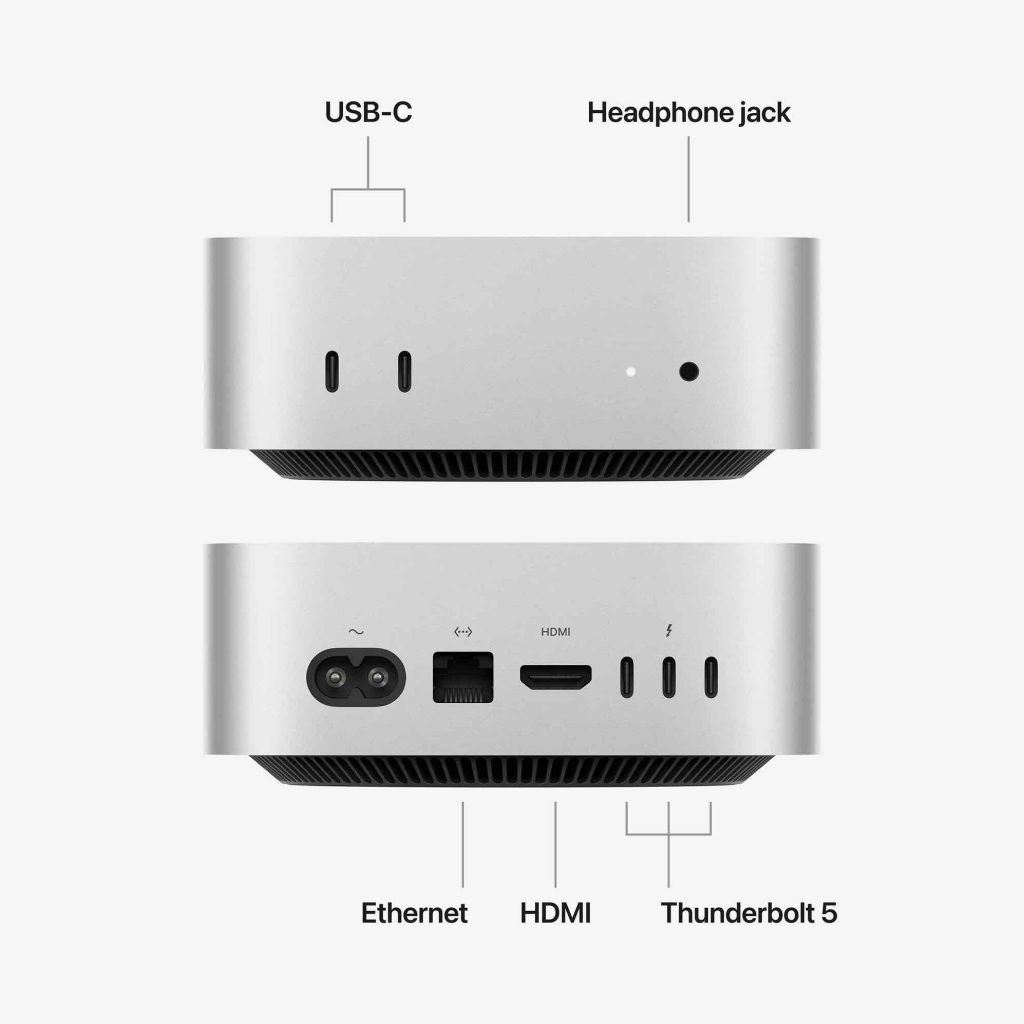
The port layout also remains familiar. The front panel features two USB-C ports and a 3.5 mm headphone jack. On the back, there are HDMI, Ethernet, and three Thunderbolt ports. The main difference between the versions is the Thunderbolt standard: the Mac mini with M6 uses Thunderbolt 4, while the M5 Pro model features the faster Thunderbolt 5.
Overall, there are no major changes to the exterior. The key upgrades are inside the enclosure, including new chips, higher performance, and expanded connectivity options.
You can explore the available configurations in the catalog:
How Much Does the Mac mini 2026 Cost and Where Can You Buy It?
The computer is available in silver and will be offered in different memory and storage configurations. The Mac mini price in Georgia will be announced closer to the start of sales. You can follow updates about availability and preorder options on the iSpace website. Experts can help compare the M6 and M5 Pro versions and select the configuration that best suits your needs.
iSpace is an Apple Premium Partner in Georgia. Its stores offer genuine Apple devices with a manufacturer’s warranty, while authorized iSupport service centers are available for device maintenance and repairs.
You can make a purchase online or visit one of the conveniently located iSpace stores in Georgia, including locations in Batumi and Tbilisi, where in-store pickup is also available. To upgrade your computer on more favorable terms, you can use Trade In, installment plans, or financing from partner banks.
You can follow updates about the start of sales and the availability of different configurations on the iSpace website and social media channels.
FAQ
What Has Changed in the New Mac mini 2026?
The hardware has been upgraded. The base version has moved from the M4 to the M6, with a 12-core CPU, 12-core GPU, up to 32GB of unified memory, and an SSD that is up to twice as fast. The higher-end model features the M5 Pro and Thunderbolt 5 ports. Both versions support Wi-Fi 7, Bluetooth 6, and 2.5Gb Ethernet.
Is the New Mac mini Worth Buying?
Yes, if you need a quiet desktop computer for video editing, software development, or working with local AI models. In terms of specifications and price, it is one of the most balanced Mac computers. The M6 version covers everyday home and office tasks, while the M5 Pro is better suited to 3D, VFX, and demanding professional projects.
Which Processor Does the Mac mini Have?
The base version is equipped with the Apple M6 chip featuring a 12-core CPU and 12-core GPU, with an AI accelerator built into each GPU core. The more powerful model comes with the M5 Pro: the standard configuration includes a 15-core CPU and 16-core GPU, while the top configuration offers up to an 18-core CPU and 20-core GPU.
What Did Apple Reveal About the Mac mini 2026?
In the press release, Apple placed particular emphasis on AI performance. AI processing speeds increased by up to four times, graphics and SSD performance by up to two times, and CPU performance by 40% compared with the previous M4 generation. Apple also demonstrated how multiple Mac mini computers can be connected via Thunderbolt 5 for working with large local AI models.
What Is the Difference Between Mac mini and MacBook?
The Mac mini 2026 is a desktop computer without a built-in display or battery, so you connect your own monitor, keyboard, and mouse. A MacBook is a laptop with a 13-, 14-, or 16-inch display and a built-in battery. The Mac mini is designed mainly for stationary use, while the key advantage of a MacBook is portability.
Read Also
Always be aware!
Subscribe to the newsletter and be the first to know about new promotions and special offers